Share this article

Managing your website doesn’t have to be complicated. The WordPress dashboard is your central hub for controlling content, settings, and performance—all in one place. Whether you’re updating pages, uploading media, or monitoring your site, understanding how the dashboard works can save time and improve results.
At MoDuet, we make WordPress management simple, secure, and efficient.

What Is the WordPress Dashboard?
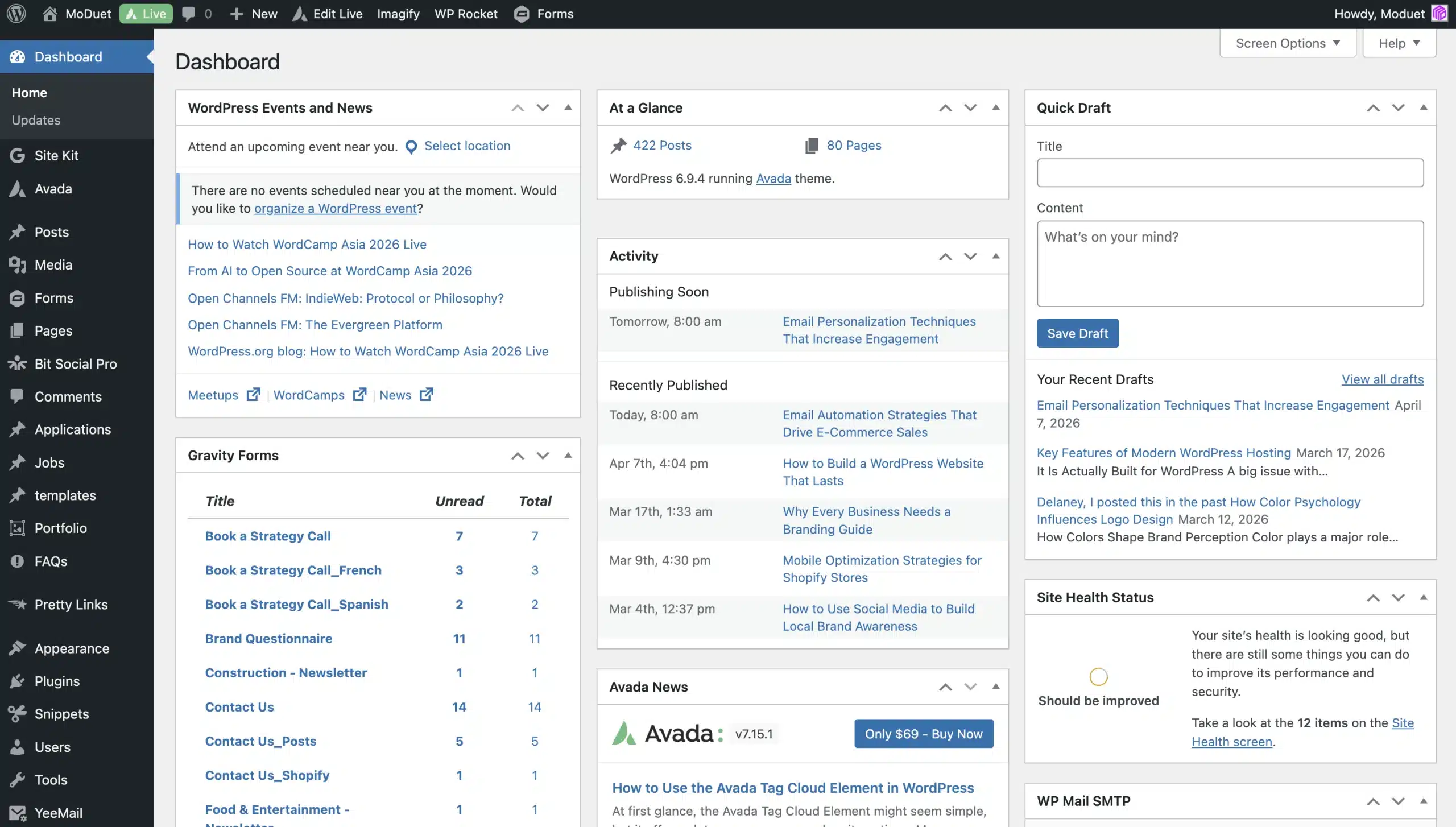
The WordPress dashboard (often accessed via /wp-admin) is the control panel for your website. From here, you can manage content, customize your site, and monitor performance.
It’s designed to give users—regardless of technical skill—the ability to control every aspect of their website from one interface.
Key Features of the WordPress Dashboard
1. Navigation Menu
Located on the left-hand side, the menu gives you access to all major features, including:
- Pages (create and edit website pages)
- Posts (manage blog content)
- Media (upload images, videos, and files)
- Settings (configure your website)
This menu is your primary tool for navigating and managing your site.
2. Dashboard Widgets
Widgets provide a quick overview of your website, including:
- Site activity
- Recent comments
- Performance updates
You can customize these widgets to prioritize the information that matters most.
3. Toolbar
The top toolbar allows quick access to:
- Creating new pages or posts
- Viewing your site
- Managing comments
It’s designed to streamline your workflow and reduce the number of clicks needed to perform common tasks.
4. Content Management Tools
The dashboard makes it easy to:
- Create and edit pages and blog posts
- Format text and media
- Preview and publish content
WordPress is built for flexibility, allowing anyone—from beginners to professionals—to manage content effortlessly.
Why the WordPress Dashboard Matters for Your Business
A well-managed dashboard helps you:
- Keep your website updated with fresh content
- Improve SEO performance through regular publishing
- Enhance user experience with organized navigation and media
- Maintain site security and performance
For businesses, this means better visibility, higher engagement, and more conversions.
How MoDuet Enhances Your WordPress Experience
At MoDuet, we go beyond the standard dashboard experience by offering:
- Managed WordPress hosting for speed and reliability
- Security monitoring to protect your site from threats
- Automatic updates and backups for peace of mind
- Expert support whenever you need it
Our goal is to help you focus on growing your business while we handle the technical side.
Tips for Getting the Most Out of Your Dashboard
- Regularly update plugins and themes
- Use the media library to keep assets organized
- Preview changes before publishing
- Customize your dashboard layout for efficiency
- Monitor performance and site health
Final Thoughts
The WordPress dashboard is a powerful tool that puts full control of your website at your fingertips. When used effectively—and supported by a reliable partner like MoDuet—it becomes the foundation for a successful online presence.

We Want To Talk To You About Your Marketing Goals.
Let’s Supercharge Your Online Growth!
By submitting the form, you agree to the Terms of Service and Privacy Policy
We Want To Talk To You About Your Marketing Goals.
Let’s Supercharge Your Online Growth!