How to Ensure Your Logo Scales Across All Devices and Platforms
How to Ensure Your Logo Scales Across All Devices and Platforms
A logo can look sharp on a computer and become unreadable on a phone. Learn which file formats to use, how to prepare logo variations, and how to test your design across digital and print applications.


Your logo may look perfect on a designer’s screen. Then someone uploads it to your website, reduces it to fit the mobile header, and suddenly the company name is unreadable.
Or the logo looks fine online, but the printer needs a larger file for a trade show banner. The only version anyone can find is a 400-pixel-wide PNG.
These are common problems, and they’re avoidable.
A scalable logo maintains its clarity and recognizable identity across different sizes, devices, and applications. Achieving that requires appropriate file formats, a design that remains legible when reduced, and variations suited to different spaces.
A vector file is an important starting point. But the ability to resize a file without losing resolution doesn’t automatically make every detail readable.
Here’s what to consider when creating a logo or evaluating one you already use.
Why Logo Scalability Matters
Your logo appears in places with very different requirements.
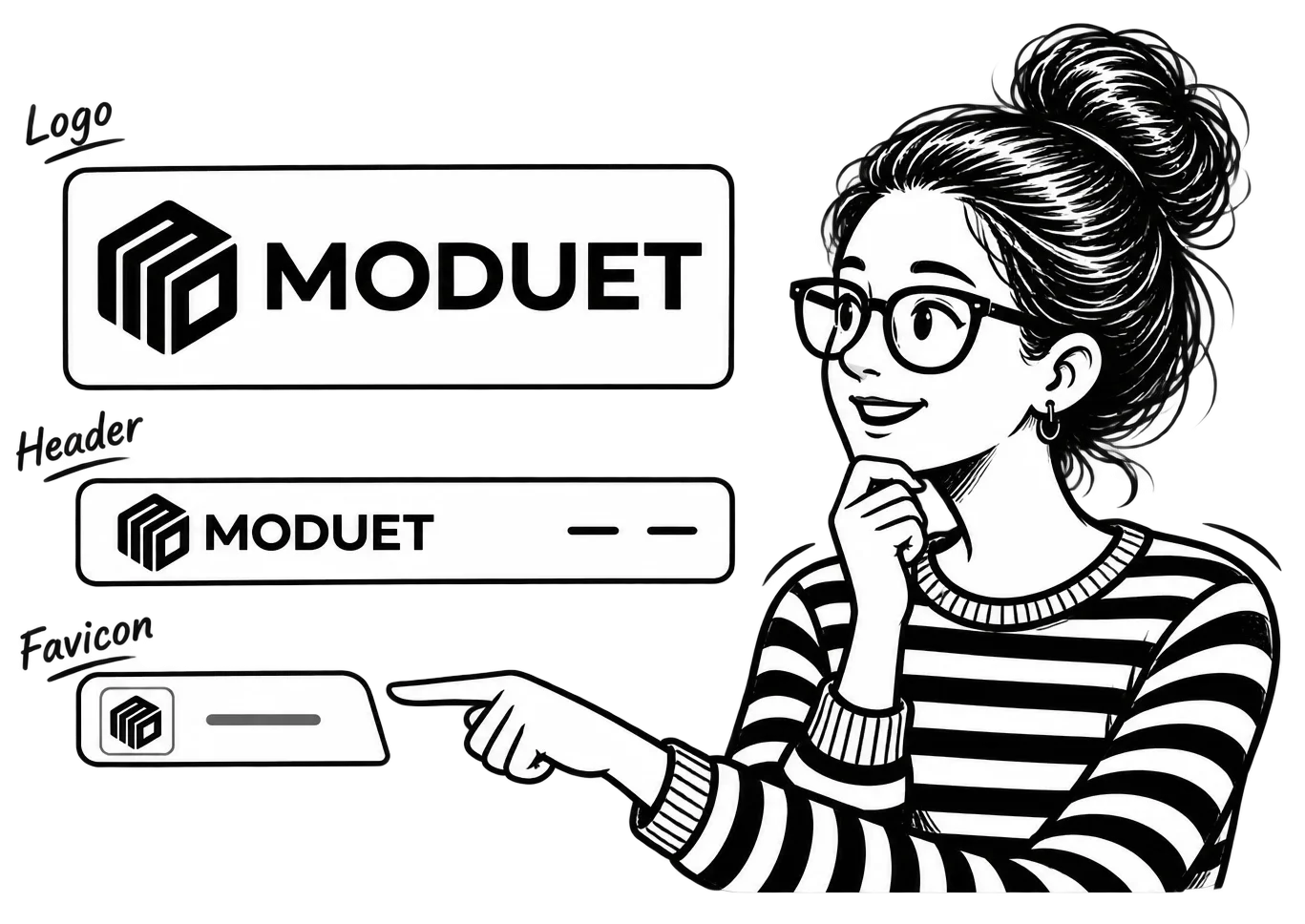
A website header may have room for your company name and symbol. A social media profile picture is usually square. A browser favicon might display at only 16 × 16 pixels. Printed signage introduces another set of dimensions and production requirements.
Using the same full logo everywhere can create problems.
Text becomes too small. Thin lines disappear. Details merge together. Someone crops the artwork to fit a square, and part of the logo goes missing.
Over time, these inconsistencies can weaken the visual identity you’ve worked to establish.
A scalable logo system helps you maintain recognition while accommodating the space available.
That doesn’t mean redesigning your logo for every platform. It means preparing the versions you actually need and setting rules for how they should be used.
Vector vs. Raster: Which Format Should You Use?
Understanding file formats is the first technical step.
Raster Files: PNG, JPG, and WebP
Raster images are made of pixels.
Formats such as PNG, JPG, and WebP can display logos, but their quality depends on the resolution of the file.
For example, if a logo is exported at 300 pixels wide and then enlarged to 1,500 pixels, the software must interpolate the additional pixels.
The result may appear blurry or pixelated.
That doesn’t make raster formats unsuitable for logos.
A properly exported PNG can work well in a website header, presentation, or social media profile. PNG also supports transparency, which makes it useful when a logo needs to appear over different backgrounds.
WebP can be useful for web delivery, depending on the application.
JPG is generally less convenient for logos requiring transparent backgrounds, and its lossy compression may produce visible artifacts around sharp edges.
The limitation is that raster files should be exported at dimensions appropriate for their intended use.
Vector Files: SVG, AI, EPS, and PDF
Vector artwork uses paths and geometric shapes to describe the design.
Those shapes can be enlarged without the pixelation associated with scaling a small raster image.
This makes vector artwork particularly useful for logos.
However, vector file formats have different purposes.
| Format | Best Use | What to Know |
|---|---|---|
| SVG | Websites and scalable digital graphics | Widely supported by modern browsers; file handling and security still matter |
| AI | Editable Adobe Illustrator source files | Useful for maintaining the original artwork |
| EPS | Certain print and production workflows | Often accepted by printers, though requirements vary |
| Vector PDF | Sharing artwork with print vendors | Must actually contain vector artwork, not just an embedded raster image |
| PNG | Web, social media, and everyday digital use | Export at the resolution needed; supports transparency |
A PDF isn’t automatically a vector file simply because it has a PDF extension.
Likewise, placing a low-resolution PNG inside Illustrator and saving it as an AI file doesn’t magically create vector artwork.
The underlying artwork matters.
Keep an editable vector master and export additional formats for specific applications.
Design Principles That Help a Logo Scale
File format solves the resolution problem. The design itself determines whether people can still recognize the logo at different sizes.
Keep Important Details Clear
Simple shapes are generally easier to reproduce at small sizes.
Consider recognizable symbols such as Apple’s silhouette or Target’s circular mark. Their basic forms remain identifiable without relying on tiny decorative elements.
But simplicity doesn’t mean every business needs a minimalist geometric logo.
A detailed logo can work well if its important features remain recognizable and you have an appropriate simplified version for smaller applications.
Pay attention to:
- Thin lines that disappear when reduced.
- Small decorative elements that merge together.
- Complex shapes that become difficult to distinguish.
- Tight spacing between letters or symbols.
- Taglines that are unreadable at common display sizes.
If an element contributes little to recognition but creates problems at smaller sizes, it may be worth removing from the compact version.
Choose Typography That Remains Legible
Typography often creates more scaling problems than the symbol itself.
A highly detailed script font may look attractive on a business card, but become difficult to read in a narrow mobile header.
Letter spacing matters, too.
Characters that sit too close together can merge visually when reduced.
Test your wordmark at the sizes where it will actually appear.
If your company name becomes unreadable, the solution may be a different font weight, adjusted spacing, or an alternate logo arrangement.
There is no requirement that every logo use a bold sans-serif font. The appropriate type depends on the identity and intended applications.
Check Color and Contrast
A logo that looks clear on white may become difficult to recognize on a dark background.
Colors with similar brightness can also lose separation when displayed at small sizes.
Test the logo in full color, grayscale, solid black, and solid white.
These variations help reveal whether the design depends too heavily on subtle color differences.
For more detailed guidance on darker backgrounds, see How to Design Logos That Work in Dark Mode.
Create Logo Variations for Different Platforms
One logo arrangement rarely works in every available space.
The solution is to build a small, coordinated set of approved variations.
Primary Logo
Your primary logo is the main version of your visual identity.
It may combine your symbol, company name, and other approved elements.
This version works best when there is enough space to display everything clearly.
Common applications include website headers, printed materials, proposals, and signage.
Wordmark
A wordmark focuses on the company name using its established typography or custom lettering.
It can be useful in horizontal layouts, where an additional symbol would make the overall logo unnecessarily wide or crowded.
Some brands use a wordmark as their primary identity and don’t need a separate symbol.
Brand Mark or Icon
A brand mark uses a recognizable symbol or simplified graphic without the full company name.
It’s particularly useful for small square applications such as social media profile images, app icons, and favicons.
However, a symbol shouldn’t be used in isolation simply because it looks cleaner.
If your audience doesn’t recognize it yet, removing the company name may reduce clarity.
A newer business may benefit from using a wordmark or combined logo wherever space permits.
Stacked and Horizontal Variations
Sometimes the most practical adjustment is changing the arrangement of the same elements.
A horizontal logo might work well in a website header, while a stacked version fits better on packaging or a square printed item.
The proportions can change without changing the underlying design.
That distinction should be documented so the logo remains consistent across applications.
How to Test Whether Your Logo Scales
A logo should be evaluated in realistic conditions before it’s finalized.
Looking at it on a large artboard at 100% zoom won’t tell you how it performs inside a mobile navigation bar or printed on a small promotional item.
1. The Shrink Test
Start with the primary logo and reduce it to several common display sizes.
For example:
- 16 × 16 pixels for a small favicon.
- 32 × 32 pixels for a larger favicon rendering.
- 48 × 48 pixels for another compact icon test.
- 120 pixels wide for a narrow mobile logo placement.
- 250 pixels wide for a typical website header test.
These are test dimensions, not universal platform specifications.
As you reduce the artwork, check whether the name remains readable, important shapes stay recognizable, and small details disappear.
Don’t expect a complete horizontal logo with a tagline to work at 16 pixels.
That is usually a job for a simplified symbol.
2. The Enlarge Test
Next, enlarge the logo substantially.
Vector artwork should retain sharp edges, but scaling can reveal design problems that weren’t obvious at smaller sizes.
Look for uneven line weights, awkward spacing, or details that feel disproportionate.
For print applications, also verify that the artwork meets the production requirements of the vendor.
A logo that looks correct on screen may still need adjustments for embroidery, engraving, or certain printing methods.
3. The Black-and-White Test
Remove the colors and inspect the design.
Can you still distinguish the main shapes?
Does the logo remain recognizable as a solid single-color mark?
This is useful for applications such as stamps, embroidery, merchandise, and documents printed without color.
If important parts disappear, consider whether the design needs stronger contrast or a dedicated one-color version.
4. The Real-World Mockup Test
Place the logo in the situations where your business will use it.
Test a website header, mobile screen, social media profile, business card, and relevant printed materials.
Don’t rely exclusively on polished mockups.
A logo centered on a large white presentation slide may look excellent while being nearly impossible to use inside a real navigation layout.
Test the actual constraints.
What Logo Files Should Every Business Keep?
When a logo project is complete, the business should receive enough files to use the identity without repeatedly rebuilding it.
A practical logo package may include:
- An editable master file.
- SVG versions for appropriate digital uses.
- High-resolution PNG exports with transparent backgrounds.
- Primary, horizontal, stacked, and simplified variations where needed.
- Full-color and single-color versions.
- Versions designed for light and dark backgrounds.
- A short set of logo usage guidelines.
Not every business needs every possible format.
For example, a company that never manufactures merchandise may not need specialized files for embroidery or engraving immediately.
But it should have access to editable source artwork so those versions can be prepared when needed.
Include Basic Usage Rules
A logo package becomes more useful when the files come with clear instructions.
Document minimum display sizes, surrounding clear space, approved colors, and the situations where each variation should be used.
Also explain what should be avoided, such as stretching the logo, changing its proportions, applying unapproved effects, or placing it on backgrounds with insufficient contrast.
A branding guide can organize these standards and make it easier for employees, designers, and vendors to use the identity consistently.
Common Logo Scaling Mistakes
Several problems show up repeatedly when businesses start using their logos across different platforms.
Stretching the logo to fit. Changing its width without maintaining the correct proportions distorts the design.
Using a small PNG for large print materials. A low-resolution file cannot provide detail it never contained.
Using the complete logo as a favicon. Small text and taglines usually become unreadable at icon sizes.
Cropping instead of using an approved variation. Removing parts of the logo to make it fit a square can damage recognition.
Assuming SVG solves every issue. An SVG preserves vector sharpness, but cannot rescue poorly spaced typography or excessive detail.
Ignoring background contrast. Transparent files can still contain colors that disappear against certain backgrounds.
Most of these mistakes are easier to prevent when logo variations and usage rules are prepared in advance.
When Should You Simplify or Redesign Your Logo?
A logo that struggles at small sizes doesn’t always need a full redesign.
Sometimes the problem is the file being used.
If the original artwork is vector-based and the design is sound, exporting an appropriate size or using another approved arrangement may solve it.
Other situations require design changes.
Consider revisiting the artwork when:
- Important elements cannot be recognized at normal display sizes.
- The typography becomes unreadable in common applications.
- The symbol is too detailed to reproduce consistently.
- Color variations don’t provide adequate contrast.
- No practical horizontal, stacked, or icon version can be created without compromising the design.
A simplified secondary mark may be enough.
If the underlying identity consistently fails across its intended uses, a broader redesign may be warranted.
The decision should follow the actual problem. Redesigning a recognizable logo because someone exported it incorrectly would be an expensive response to a file-management issue.
Build a Logo System You Can Actually Use
A scalable logo gives your business more flexibility across websites, mobile devices, printed materials, and future applications.
Start with editable vector artwork. Test its legibility at realistic sizes and prepare variations for the spaces where the full design doesn’t work.
Then document how those files should be used.
The result should be a recognizable identity that people can apply correctly without asking a designer to fix the logo every time a new platform requires a different shape.
If your current logo needs improvement, or you’re developing an identity for a new business, explore MoDuet’s Branding & Identity services for help creating logos and visual standards that work across applications.