
Share this article

Your WordPress theme controls the overall design, layout, colors, typography, and visual experience of your website. Whether you’re building a blog, business website, or online store, choosing the right theme is an important step toward creating a professional online presence.
In this guide, you’ll learn how to add a theme in WordPress, install third-party themes, activate your design safely, and customize your website without breaking anything.

What Is a WordPress Theme?
A WordPress theme is a collection of templates and stylesheets that determine how your website looks and functions. Themes control elements such as:
- Page layouts
- Fonts and colors
- Navigation menus
- Header and footer styles
- Blog formatting
- Mobile responsiveness
Themes allow you to customize your website without writing code. WordPress includes thousands of free and premium themes that can be installed directly from your dashboard.
Why Your WordPress Theme Matters
The theme you choose affects more than just appearance. A high-quality WordPress theme can improve:
- Website speed
- Mobile usability
- SEO performance
- User engagement
- Conversion rates
Modern themes are also designed to work with popular plugins and page builders like Elementor, WooCommerce, and Yoast SEO.
How to Add a Theme in WordPress
Adding a new WordPress theme is simple and only takes a few minutes.
Step 1: Log Into Your WordPress Dashboard
Go to your WordPress admin panel by visiting:
yourwebsite.com/wp-admin
Enter your username and password to log in.
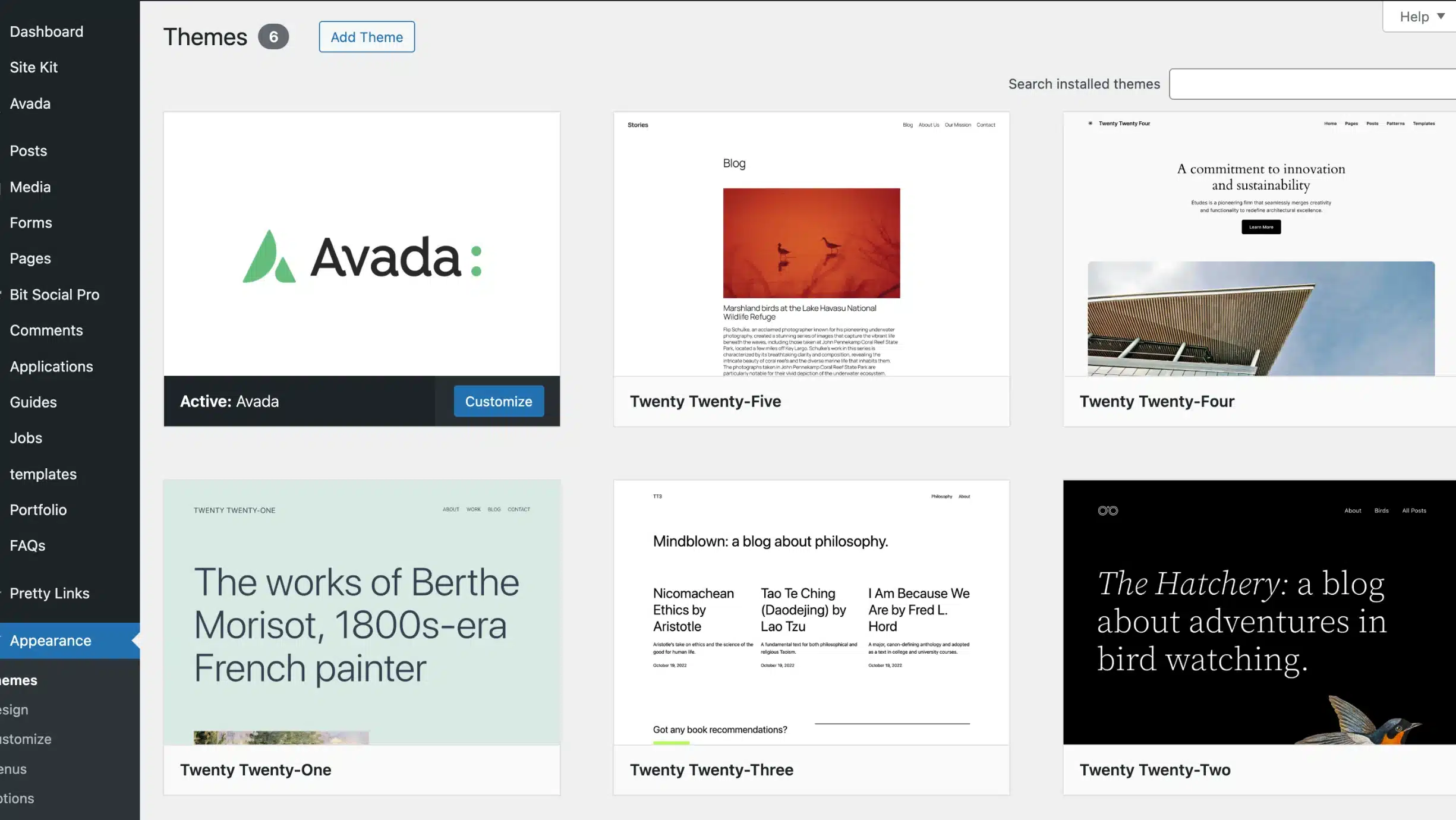
Step 2: Navigate to Appearance → Themes
From the left-hand menu in WordPress:
- Click Appearance
- Select Themes
You’ll see all currently installed themes on your website.
Step 3: Click “Add New”
At the top of the page, click the Add New button.
This opens the WordPress Theme Directory, where you can browse thousands of free themes.
You can filter themes by:
- Popular
- Latest
- Featured
- Block themes
- Specific features or industries
You can also search directly for themes by name.
How to Install a Free WordPress Theme
Once you find a theme you like:
- Hover over the theme preview
- Click Install
- Wait for WordPress to finish installing
- Click Activate
Your new theme will immediately become live on your website.
How to Upload a Premium WordPress Theme
If you purchased a premium theme from a third-party marketplace or developer, you’ll need to upload it manually.
Step-by-Step Theme Upload
- Download the theme ZIP file from the provider
- In WordPress, go to Appearance → Themes
- Click Add New
- Select Upload Theme
- Choose the ZIP file
- Click Install Now
- Click Activate
Important: Do not unzip the theme file before uploading it. WordPress requires the original ZIP format.
Preview a Theme Before Activating It
Before making a theme live, WordPress allows you to preview it on your site.
This feature helps you:
- Check layouts
- Test navigation
- Review mobile responsiveness
- See how existing content will appear
To preview a theme:
- Hover over the theme
- Click Live Preview
This is especially useful if your site already contains blog posts, images, or custom pages.
Customize Your WordPress Theme
After activation, most themes allow customization through the WordPress Customizer or Site Editor.
You can typically edit:
- Logo and branding
- Colors and typography
- Homepage layout
- Menus
- Widgets
- Header and footer content
To customize your theme:
- Go to Appearance → Customize
- Or use Appearance → Editor for block themes
Modern block themes provide even more flexibility using full-site editing tools.
Tips for Choosing the Best WordPress Theme
Not all themes are created equal. Before installing a new theme, look for these qualities:
Mobile Responsive Design
Your website should work smoothly across desktops, tablets, and smartphones.
Fast Loading Speed
Heavy themes can slow down your site and hurt SEO rankings.
SEO-Friendly Structure
Choose themes built with clean code and proper optimization practices.
Plugin Compatibility
Your theme should work well with popular WordPress plugins and page builders.
Regular Updates
Outdated themes can create security vulnerabilities and compatibility issues.
Common WordPress Theme Mistakes to Avoid
Installing Too Many Themes
Inactive themes still take up space and can create maintenance issues. Delete unused themes regularly.
Editing Theme Files Directly
Direct edits can disappear after updates. Use a child theme when making advanced customizations.
Ignoring Backups
Always back up your website before changing themes, especially on live business websites.
Final Thoughts
Learning how to add a theme in WordPress is one of the first essential skills every website owner should know. Whether you choose a free theme from the WordPress repository or upload a premium design, the right theme can completely transform your website’s appearance and performance.
If you want a professional website that’s optimized for SEO, speed, and conversions, choosing the right WordPress theme is only the beginning.
At MoDuet, we help businesses create high-performing WordPress websites designed to grow traffic, improve rankings, and generate leads.

We Want To Talk To You About Your Marketing Goals.
Let’s Supercharge Your Online Growth!
By submitting the form, you agree to the Terms of Service and Privacy Policy
We Want To Talk To You About Your Marketing Goals.
Let’s Supercharge Your Online Growth!







